


If you suspect that your website’s database tables are fragmented, inefficient, or damaged, you can use the optimization and repair tools available in phpMyAdmin.
Table of Contents
Optimizing or Repairing Database Tables
- Log in to the phpMyAdmin panel.
- Select the database you want to manage from the list on the left-hand side.
- Once the database structure is displayed, scroll to the bottom of the table list.
- Click Check All to select all tables in the database.
- From the With selected drop-down menu, choose one of the following options:
- Optimize table – Improves table performance and reclaims unused storage space.
- Repair table – Attempts to fix corrupted tables and restore their functionality.
- Confirm the operation if prompted.
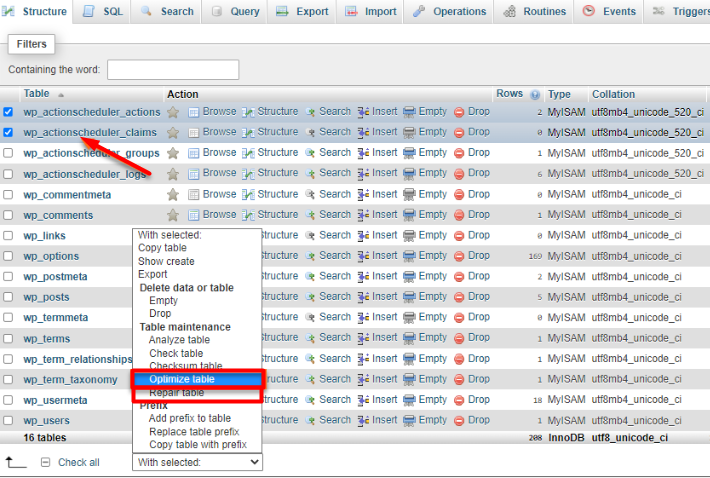
The duration of the process depends on the number and size of the tables in the database. Small databases may complete within a few seconds, while larger databases can take several minutes.
When to Optimize Tables

Table optimization can be useful when:
- Your website feels slower than usual.
- A large amount of data has recently been deleted.
- Database tables have become fragmented over time.
- You want to improve overall database performance.
When to Repair Tables
Table repair may be helpful when:
- Database-related errors appear on your website.
- Specific tables become corrupted.
- Applications report issues accessing or reading data.
- You have restored a database from a backup and encounter table integrity problems.
Note: Before performing database maintenance, it is recommended to create a backup of your database to prevent accidental data loss.