


Before you can create CRON tasks, the CRON service must first be activated for your hosting account. This prepares the hosting environment so scheduled commands can run correctly.
CRON tasks are useful when your website or application needs to perform actions automatically at specific times or intervals. For example, they can be used for maintenance scripts, scheduled imports, cleanup tasks, or background processes required by some applications.

To activate the CRON service:
- Log in to the mybox panel.
- Go to Additional services.
- Select CRON tasks.
- Click the activation button.
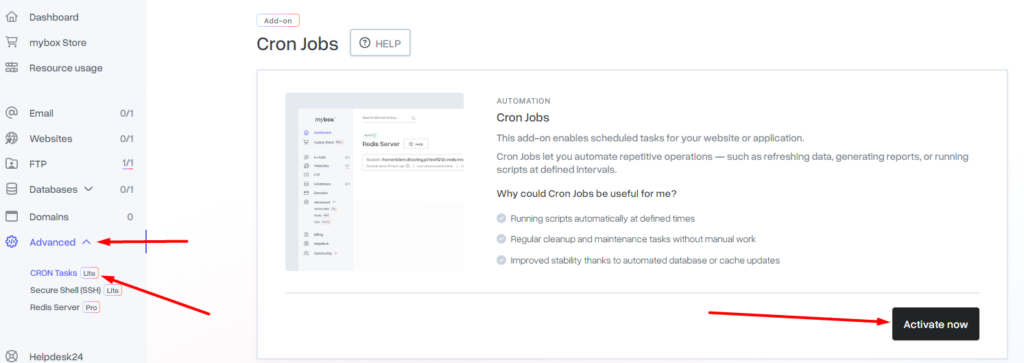
The activation procedure only needs to be completed once for the hosting account.
After the service is activated successfully, the CRON task management module will be displayed automatically. From there, you can create and manage scheduled tasks for your hosting environment.
You can learn how to add a CRON job in THIS tutorial.