


phpMyAdmin is a powerful, web-based tool provided by mybox that allows you to manage your MySQL databases without writing complex code. It provides a visual interface to view tables, run SQL queries, and export or import data.
Table of Contents
Context
When you need to perform administrative tasks-such as changing a WordPress password, updating site URLs, or backing up a specific table-phpMyAdmin is the standard utility used. To access it, you must use the specific credentials of a MySQL User who has been assigned to that database.
How to log in

There are several ways to access the phpMyAdmin interface through the mybox panel:
- Direct Link: You can navigate directly to https://phpmyadmin.mybox.com/
- Dashboard Shortcut: A quick-access link is available on your mybox panel homepage.
- Database Section:
- Go to the Databases module.
- Select MySQL Databases.
- Click the phpMyAdmin button next to the database list.
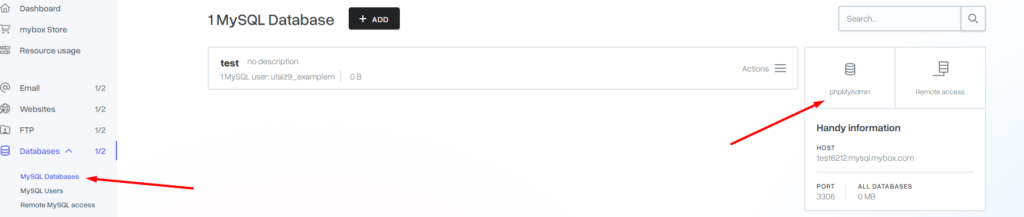
Credentials Required
To log in, you will need:
- Username: The MySQL username you created in the MySQL Users tab.
- Password: The password assigned to that specific MySQL user.
Note: Your mybox panel login (the one used for billing and general settings) will not work for phpMyAdmin unless you have manually created a database user with the same credentials.
Distinction: mybox panel vs. phpMyAdmin
- mybox panel: Used for infrastructure management (creating the database, adding users, setting permissions).
- phpMyAdmin: Used for data management (editing rows, deleting tables, running SQL scripts inside the database).
Practical Implications
- Security: Always log out of phpMyAdmin when finished, especially on public networks. Because it has direct access to your data, it is a sensitive area of your hosting environment.
- Timeouts: For security, phpMyAdmin sessions will automatically expire after a period of inactivity, requiring you to log in again.
- Finding Credentials: If you have forgotten which user is assigned to a database, you can check the MySQL Users tab in the mybox panel to see the list of assignments.
Summary
phpMyAdmin is the primary gateway to your website’s data. By accessing it through the mybox panel and using your dedicated MySQL credentials, you can perform deep-level maintenance and optimizations on your database with ease.