


Table of Contents
Context
Each website in mybox is managed as a separate service within the hosting panel. From the website list, you can access configuration details, security settings, file access, and related services such as email, FTP, and databases.
To manage a website, go to the list of websites and click either the website name or the Status button next to it.
Website management sections
Website Information
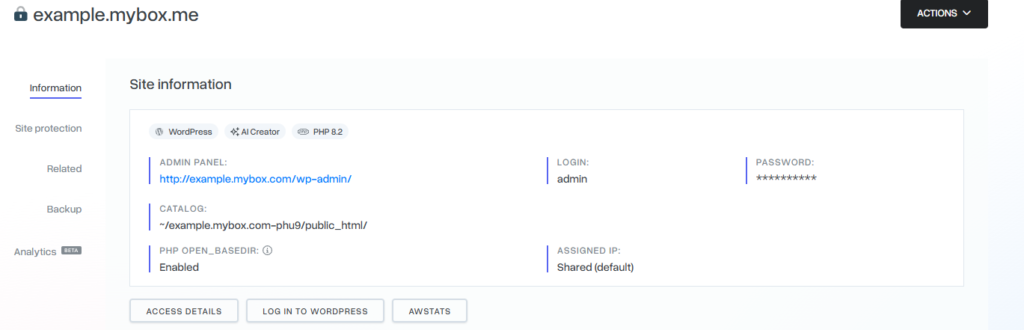

This section provides general technical details about the website, including:
- the FTP directory the website is pointing to
- the active PHP version
- installation date and last modification date
- access credentials and configuration details
This information is useful for verifying the technical setup of the website.
SSL Certificate

This section shows the status of the SSL certificate assigned to the website.
You can:
- view current SSL status
- check certificate details
- order a new SSL certificate if needed
WWW Aliases

WWW aliases are additional domain names assigned to the same website.
In this section you can:
- view existing aliases
- add a new alias
- assign an existing alias to the website
Aliases allow multiple domains to point to the same content.
Email Addresses

This section lists all email accounts associated with the website.
From here you can:
- view existing mailboxes
- manage email accounts linked to the domain
FTP Accounts

This section shows FTP accounts connected to the website.
Each FTP account provides access only to the assigned website directory, ensuring isolated file management per site.
MySQL Databases

This section displays database connections linked to the website.
You can view:
- the database name
- the associated database user
- connection details used by the application
This is useful for troubleshooting CMS applications such as WordPress or PrestaShop.
Summary
Website management in mybox is centralized in the website details view. From there, you can manage technical configuration, SSL certificates, aliases, email accounts, FTP access, and database connections in one place.