


In mybox.com, we offer active protection for the login panels to the “WordPress” backend. Every traffic coming to wp-login.php and wp-admin coming from a foreign IP address is additionally verified by “reCaptcha”.
Calls to xmlrpc.php are blocked automatically and rejected with a 403 error code.

Thanks to this, your websites based on the “WordPress” engine are protected against Brute Force attacks.
If you have websites created by the application auto-installer (based on “WordPress”) on your account, you can manage this protection yourself.
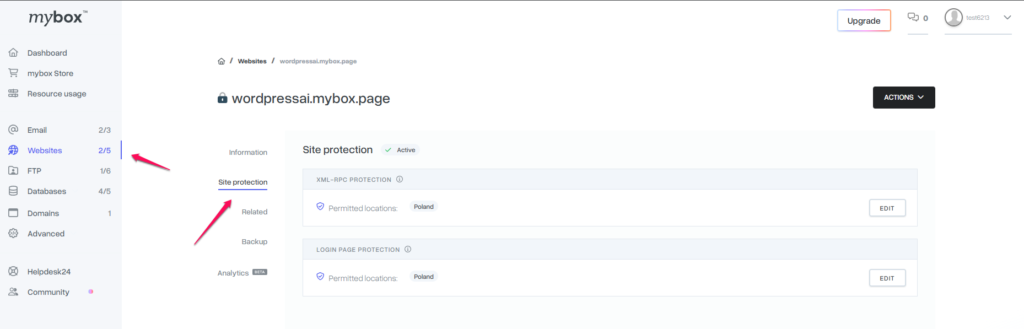
Table of Contents
I want to secure a WordPress site installed by myself
In this case, protection is active as for apps installed by the autoinstaller.
If you would like to add countries to the list of allowed locations from which access would take place, please contact our Customer Service via the 24h Helpdesk.
Access the login page from selected IP addresses
If you would like to restrict access to the login page to only your IP address, for example, you need to edit the file in your website directory .htaccess.
Add the following code in it, replacing XX.XX.XX.XX with your IP address.
File lock wp-login.php (if logging in is through a file with a different name, replace it).
<files wp-login.php>
Deny from all
Allow From XX.XX.XX.XX
</files>
Folder Access Lock
If you want to block access to a folder (e.g. /administrator for websites based on the “Joomla” engine) in the /administrator directory, create a .htaccess file and add the following code to it. In the XX.XX.XX.XX space, enter your IP address.
order deny,allow
deny from all
allow from 46.242.149.10
You can do the same in the case of a store based on “PrestaShop” – all you have to do is add the mentioned .htaccess file to the directory where the store management panel files are located.
Access only from IP addresses in a certain country
If you would like anyone with a IP address from a specific country to be able to access the selected file or directory, add a list of addresses to the .htaccess file, which you can generate at this link.