


Static pages are an essential part of every online store. Unlike product or category pages, they contain important information about your business and policies.
Common examples include:
- Terms and Conditions
- Privacy Policy
- About Us
- Delivery Information
- Returns and Refund Policy
- Contact Information

In PrestaShop, these pages are managed as CMS Pages.
Table of Contents
Add a new page
In the PrestaShop admin panel, in the left menu, select Improve, Design, and then Pages. Press +Add new page.
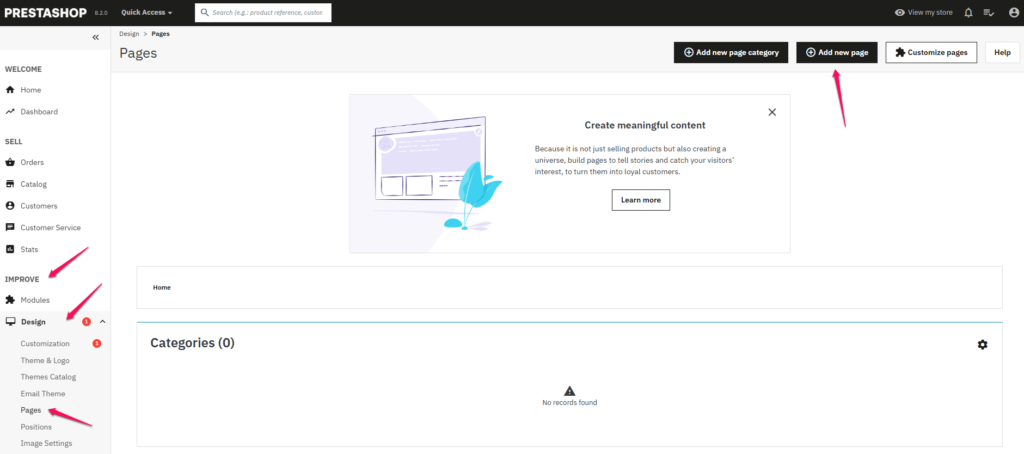
On the newly opened page, specify:
- Page categoryy – the category to which the new page will belong. In PrestaShop 1.7, this is the home page by default. If you want the page to belong to a different category, be sure to create it first (Sales → Catalog → Categories → +add a new category).
- Title – the name of the newly created page.
- SEO Preview – a live preview of an address displayed in search engines, e.g. google.
- Meta-title – the name of the page to be displayed in search engines.
- Meta description – a short description of the page intended for search engines.
- Meta keywords – keywords that describe the content of the page, also intended for search engines.
- Friendly URL – Automatically created URL based on the name.
- Page contenty – the main content of the page. This is where you need to place the target content that you want to display on the store’s website, e.g.: terms and conditions.
- Search engine indexing – whether the website is to be indexed by search engines.
- Displayed – setting whether the page should be visible or invisible.
Edit an existing page
To edit an existing CMS page in your PrestaShop admin panel, select Improve, Design, and then Pages. In the Pages column of the Home category, or any other category, find the page you want to edit. When you press the pencil icon, you will be taken to the editing page. Once you’ve made the necessary changes, click Save.
SEO Best Practices
When creating static pages:
- Use unique page titles.
- Write clear meta descriptions.
- Use descriptive URLs.
- Keep important legal and informational pages indexed.
- Review content regularly to keep it up to date.
Summary
To create a new static page in PrestaShop:
- Log in to the administration panel.
- Navigate to:
Design → Pages- Click:
Add New Page- Complete the page details and content.
- Configure SEO settings.
- Click:
SaveTo edit an existing page, return to the Pages section and use the Edit icon next to the desired page.