


If your domain is already configured in Cloudflare, you can connect it to the mybox panel to synchronize DNS settings and enable centralized management.
This integration allows DNS records from mybox to be reflected in your Cloudflare account.
Table of Contents
How to connect Cloudflare
1. Open domain actions

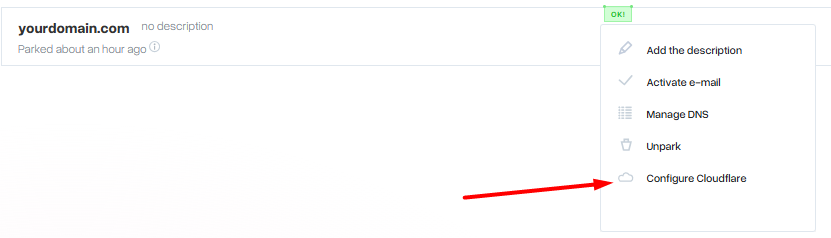
Go to the list of domains in your mybox panel.
Next to the selected domain, click Actions.
From the menu, select Configure Cloudflare.
2. Enter Cloudflare account credentials
A configuration window will appear asking for your Cloudflare login details.
Enter the credentials of the Cloudflare account where the domain is already configured.
Make sure you use the correct account associated with that domain.
3. Confirm connection
After submitting the credentials:
- the domain status will change to In progress
- the system will begin linking the domain with Cloudflare
- the process usually takes a few minutes
4. Successful connection
Once completed successfully, the domain status will show:
Yes
This indicates that the domain is properly connected to Cloudflare and synchronized with the mybox panel.
Important note
After enabling this integration, DNS zone records from the mybox panel will be mirrored into your Cloudflare account. This ensures consistency between both systems.
Summary
Linking a domain to Cloudflare in mybox is done through the domain actions menu by selecting “Configure Cloudflare” and authenticating your Cloudflare account. Once connected, DNS records are synchronized automatically between mybox and Cloudflare.