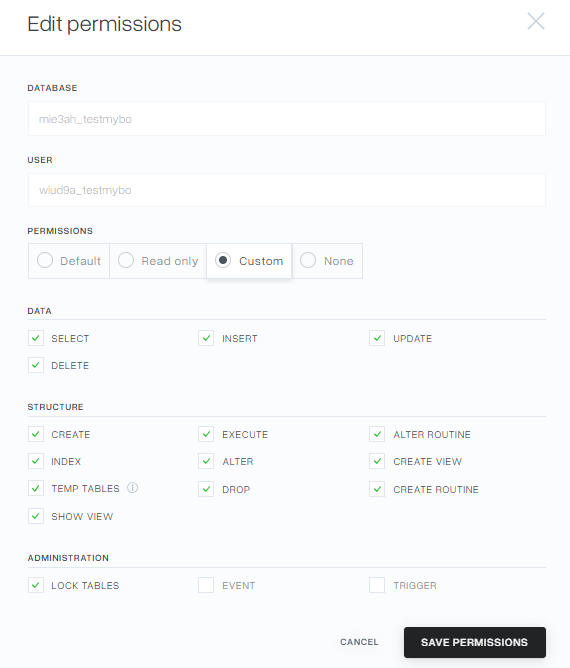
From the the mybox panel level, you can manage databases, but also users who are associated with a specific database. Each user is granted read and write permissions by default, but there may be a situation where you would like to change the form of these permissions. The following steps will show you how to edit permissions.
Keep in mind that changing the permissions for a database user incorrectly can cause your website to not work properly. In most cases, the default settings are sufficient and there is no need to edit them.

1. In the the mybox panel, in the menu on the left, expand “Databases” and then select “MySQL databases”.

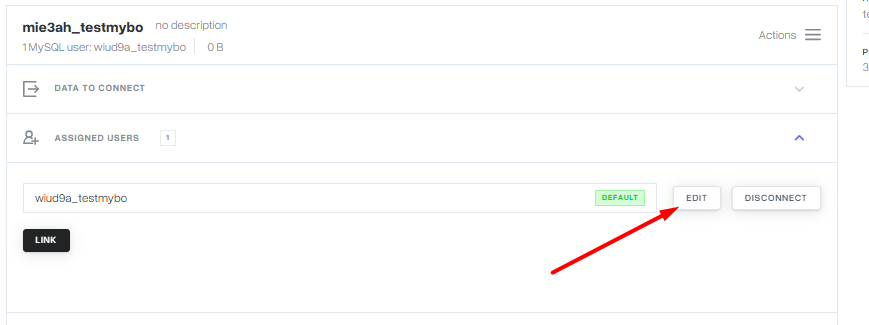
2. Then find the base you want to perform the action against. Click on the row where the database is located, which will make additional options expand. Select “Assigned Users” from the list, then click the “Edit” button next to the selected user.
3. In the window that appears, you have the option to modify the permissions for the selected user. These are the following settings: “Default”, “Read only”, “Custom” and “None” , which will make it impossible for a given user to perform any operations on the database.

3a. If the presets do not meet your requirements, you can use the custom permissions option. Here you have the option to disable many of the default options or enable the “EVENT” and “TRIGGER” options, which are disabled by default.