


Once you have generated a PGP key for your email identity, you can use it to encrypt outgoing messages and share your public key with recipients.
PGP encryption ensures that only the intended recipient can read the message contents, while your public key allows others to send encrypted messages to you.
Table of Contents
Prerequisites

Before sending an encrypted email, make sure that:
PGP functionality is enabled for your identity.
A PGP key pair has been generated for your mailbox.
The recipient’s public key is available if you want them to be able to decrypt the message.
Creating an Encrypted Message
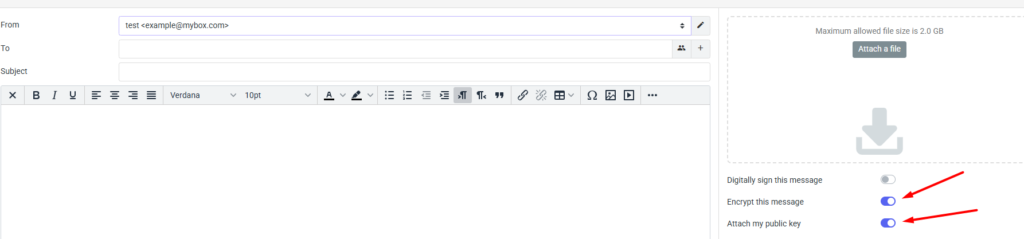
After selecting the option to create a new message, on the right side you will find additional elements and the ability to send your public key to the recipient and to encrypt the message you send.
Keep your private key protected with a strong password.
Encryption is only effective if the recipient has the necessary key to decrypt the message.
Digital signatures can be used independently of encryption to verify message authenticity