


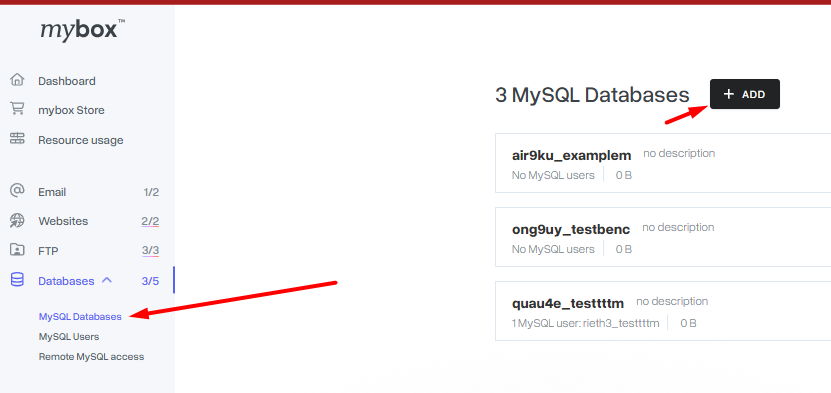
In order to create a new database, select the Databases option in the mybox panel, then MySQL Databases and click +Add. From the list, select Add database.
In the newly opened form, select the user who will have permissions to it, the degree of permission and enter the name.

The database name, including the login, can be up to 64 characters long.
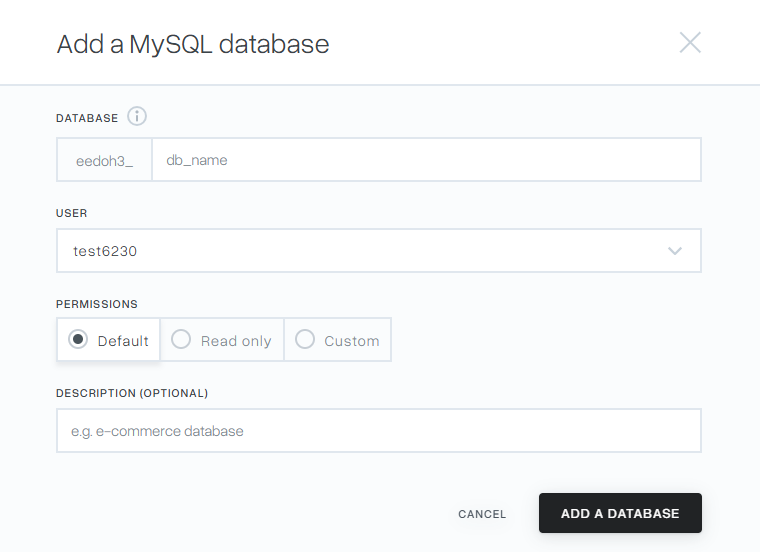
After verifying the entered data, save the changes by clicking Add database.
- Full – the user has permissions for each operation on the database.
- Read only – the user can only ‘view’ the database, they do not have permission to edit it
- Individual – the user has precisely defined permissions. The list of permissions is displayed after clicking on the Individual button.