


In a situation where “WordPress” does not have the ability to properly communicate with the database, instead of your website, you may receive a message like the screenshot below.

The most common reason is to change the password to the database from the mybox panel, after which the new password has not been updated in the “WordPress” configuration file, or the WordPress configuration file – wp-config.php located in the main directory of the website has been modified. When any of the fields responsible for communication with the database has been edited, it may result in an error.

The wp-config.php file is located in the root directory of the domain. By default, when you connect to an FTP server, it will be the path: /yourdomain.com/public_html
The parameters responsible for communication with the database are:
define('DB_NAME', 'database_name'); // MySQL database name
define('DB_USER', 'user'); // MySQL database username
define('DB_PASSWORD', 'password'); // MySQL database password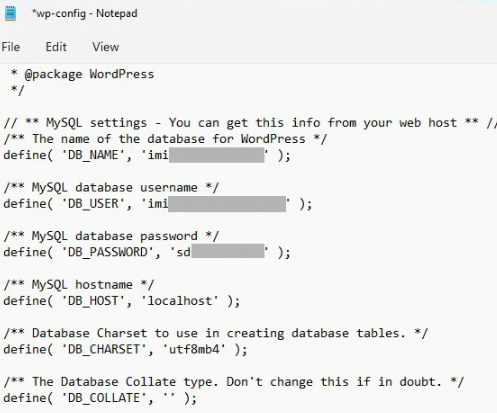
This data is randomly generated when you perform an automatic installation from the mybox panel, while when the installation is done manually, you define it yourself when creating the database.
Changing the password for a database user
If there is such a need and you do not know what password is currently set, and the one present in the file wp-config.php does not work properly, you can set a new one through the mybox panel.
Once you’re logged in, go to the “Databases” section and there “MySQL Users”.

On the page that opens, based on the contents of the wp-config.php file, find the user and click the “Change Password” button on the right. In the window that appears, you will be able to use the generator or enter any password of your choice and thus modify it.
Once you have ordered a change in the mybox panel, the last step will be to go back to the wp-config.php file and enter the newly established password there.