


In many cases, if your message cannot be delivered to the recipient, you will receive an automatic return email, which will include, among other things, the reason for the non-delivery.
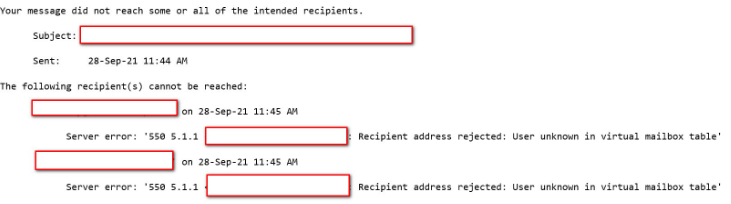
Below you will find the most common mistakes in delivering emails to recipients.
Table of Contents
Account issues

The most common reason for errors marked as “Recipent address rejected” is an incorrectly entered recipient address. Perhaps a typo crept in when typing it or the box to which you want to send your message simply does not exist.
Exceeded Mailbox Quota

When “Mailbox is over quota” appears in the return email after sending a message, it means that the recipient’s inbox is overfilled and cannot accept your email.
Connection Time Exceeded
If you find the phrase “Connection timed out” in the return message, it means that our servers were unable to connect to the recipient’s infrastructure. In this case, we will try to deliver the message a few more times. Perhaps at some point the message will be delivered.
If after several attempts the shipment still does not take place, you will receive a notification of failure. In this case, be sure to contact the Customer Service Office via the Helpdesk 24h or by phone.
Sender Verification Error
When you see the message “5.7.8 Error: authentication failed: authentication failure” after sending the message, it probably means that you have saved the wrong login details for mybox.com mail servers in your email client. Verify that the mailbox password you entered is correct.