


E-mail is one of the services provided via the Internet, used to send text messages (e-mail). An e-mail account on our server can be compared to a kind of mailbox into which other computers, through their service providers (“postmen”) upload their messages and from which our e-mails are downloaded. It is protected by an access password so that no unauthorized person can read our correspondence or send it on our behalf.
E-mail accounts can be set up both in the Clients’ domains and in the mail.mybox.com domain specially prepared by us.
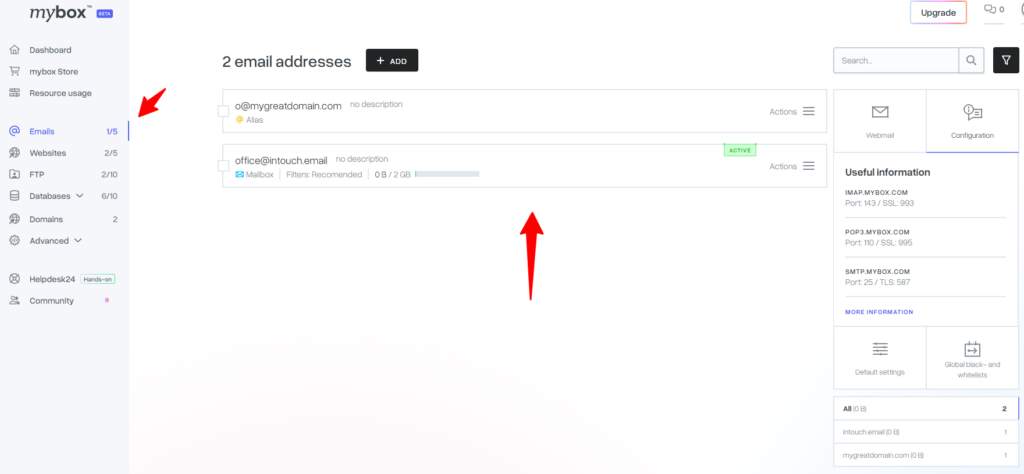
Table of Contents
Basic management
Defaults

It is possible to define default settings for newly created e-mail boxes. Just click on the Default Settings button.
A form will be displayed to define the basic settings.

- List of available filters – you can initially specify which anti-spam filters should be active for newly created mailboxes (information on anti-spam filters can be found here),
- Receiving mail – you specify whether mailboxes can be configured using the POP3 and IMAP protocols,
- Sending mail – you decide whether you will be able to send messages from mailboxes,
- Mailbox limit – you set the capacity limit for new mailboxes.
Once you’ve created a mailbox with the default settings you’ve created, you’ll be able to edit it later.
About Mailboxes
Under the name of the box, you will find three basic information. Whether it’s a mailbox, an alias, or a mailbox and an alias at the same time, how much storage space the address occupies, and what is the level of spam filters set.

On the right side of the mailbox list, you will find statistics on how many addresses and email aliases you have in the selected domain. Clicking on the domain name will display all addresses with that extension.
Below the statistics, you will find a filter that allows you to display the boxes in terms of volume. Verification is possible on the basis of 25%, 50%, 75% and 100% occupancy of the e-mail box.
Archiving – Disable option
You can mark mailboxes as disabled to manage all your mail even more easily.
Turning off the mailbox performs the following operations:
- disabling IMAP (including mail.mybox login), SMTP (receiving and sending mail)
When the box is turned off, you can:
- Receiving new messages from senders
- Turn the mailbox back on
You can also turn off more than one crate at a time.
PHP mail() function
The mail() function of PHP is enabled by default for every hosting account, in the list of mailboxes it is titled as Mailbox of the function mail() in PHP and cannot be deleted.