


If you want to use the e-mail boxes you have in Google Workspace (formerly known as Google Apps or Google Suite) on a parked or purchased mybox domain, you should modify a dozen or so entries in the domain’s DNS zone. You can do this manually according to the guidelines provided in the Google Help articles, but we provide you with automatic zone modification so that your mail is routed correctly and works with Google Workspace.
In the first step, log in to the mybox panel, and then go to the “Domains” section.
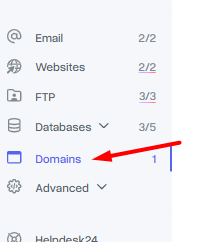

Then select the domain by clicking on its name and go to the tab: “Parked”, where you will find a button that allows you to open the domain DNS zone management page.

The final step is to select the action button (in the upper right corner) and select “mail forwarding to Gmail”.

Remember that every change at the level of domain settings, i.e. DNS servers or DNS zones,
requires the so-called propagation, i.e. the broadcasting of changes on the Internet.
This process is independent of us and can take up to 24 hours.
When editing manually, you must enter the values of the lowercase entries.
In the case of manually entering the values of e.g. destination addresses of hosts from capital letters, the mybox panel will not accept such a change.