


A 301 redirect is used when you want to permanently forward one domain or URL to another address. This is commonly used when changing a domain, merging websites, or redirecting traffic to a new location.
In mybox, redirects can be configured using the .htaccess file or through the panel, depending on the setup.
Table of Contents
Method using rules in the .htaccess file

Note, such an action requires adding a new blank website in the mybox admin panel – a detailed description of how to do this can be found HERE.
It may happen that you have already added a domain to the list of websites, there was a website that you do not want to delete definitively, but only for the moment direct traffic to another address. Therefore, you can use a simple rule, which after connecting via FTP or SSH, should be placed in the .htaccess file (there is a dot in the name and this file does not have an extension), which will be located in the main folder where your website is already located (by default it is the public_html folder).
RewriteEngine On
RewriteCond %{HTTP_HOST} ^(www\.)?yourdomain\.com [NC]
RewriteRule (.*) https://destination_address.com/$1 [R=301,L]
If such a file is already in the root folder of your website, add the indicated rule at the beginning of the file.
However, we suggest creating a new file that contains only the indicated rule.
Method via Web Alias created from the mybox administration panel
1. After logging in to the mybox panel, go to the “Websites” section. Click the “+Add” button and select “Web Alias” from the list
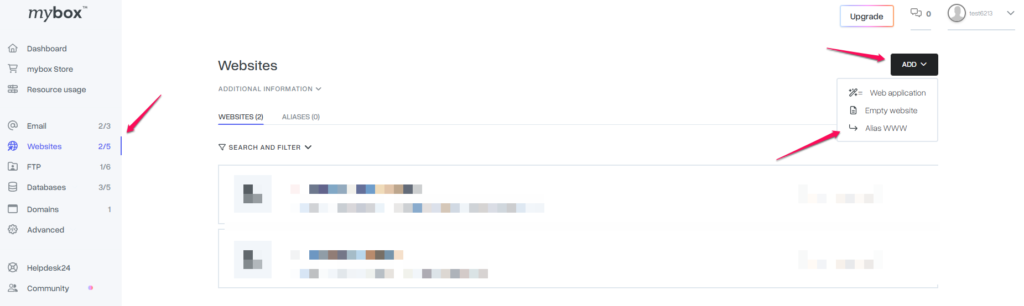
2. In the box that appears in the first box, select the domain or subdomain with the option to create one that is in your account. This will be the source address, i.e. the one from which the redirect will take place.
In the destination address field, enter the full address of the page to which you want to be redirected. In our example, it is: https://targetdomain.com
You must have noticed that we have an activable option to mask redirects.
Checking this option will generate a file containing an iframe, the so-called floating frame with a width and height of 100%. This will result in the fact that while without using this option, after being redirected to the destination address, the address in the address bar of the web browser will change, using an iframe it will not. The source address will remain visible in the browser’s address bar.
This option is available, but we do not recommend using it because, on the one hand, if a visitor would like to copy the address of a subpage of your website, for example, send a direct link to a product in your store to friends, they will not be able to do so. Similarly, if the redirection were to open a fanpage on Facebook or a similar service, this form will not work, because Facebook does not allow loading pages in an iframe, so visitors will see a blank page.
