


PrestaShop, like most popular CMS (Content Management System), allows you to expand the functionality by installing additional modules, whether by PrestaShop or third parties. There are two ways to install an additional module. From the directory available from the PrestaShop backend or by uploading a .zip file received from the author.
Table of Contents
Installation from the module catalog
Once you’ve logged in to the backend of your PrestaShop-based store, go to the Modules section in the menu on the left, and then select Catalog.
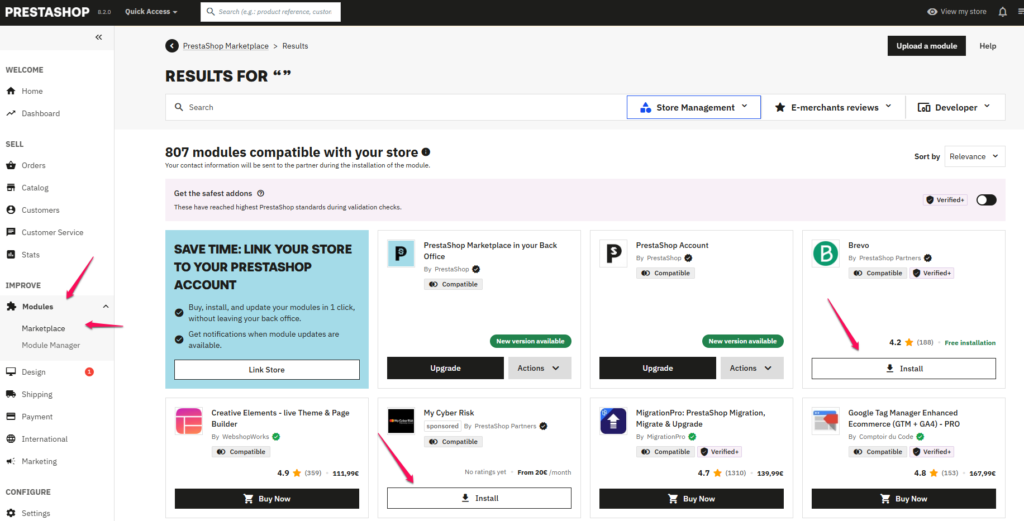

On the page that loads, you will find a collection of paid and free modules recommended by PrestaShop authors. If the module you are interested in is not visible in the general list, you can use the built-in search engine. There is also the possibility of filtering based on the category to which a given module belongs.
Once we have searched for the module that we want to install in the case of free ones, we just have to click on the Install button and wait a while. After installation, the module will activate automatically and will be ready for further configuration, if the module requires it.
Installing a module from a .zip file
In some cases, it may happen that a module of a given author will not be available in the catalog described above. In the case of free modules, most often the author will make the package of .zip available for download on their website. The same applies to some paid modules, where the author sends the buyer a package of .zip with the module after paying the payment.
In such a situation, when we have a file downloaded from the author, .zip log in to the backend of our store based on PrestaShop, then go to the Modules section in the menu on the left and select the Catalog item.
In the next step, on the page that will load in the upper right corner, click the Load module button.

In the pop-up window that appears, click on the item select file or drag the .zip file received from the author.

After a while, the module will be installed and, if it has such an option, it will be available for further configuration.