


Sometimes an incorrectly performed update or a conflict caused by incompatibility of plugins or a template can cause a website based on the “WordPress” CMS to not work properly. One of the first actions you can take is to disable all plugins, with the chance that the troublesome one will be disabled then as well. But how to do it when the website and the backend are not responding? Below you will find two methods.
Table of Contents
Method One – FTP
Log in to your FTP account (HERE you will find a guide on how to do it with WinSCP), then go to the directory where your website based on CMS “WordPress” is located. Next, open the site directory (by default, this is public_html), go to the wp-content directory, and by right-clicking on the name of the plugins directory, select the Rename / Rename option.
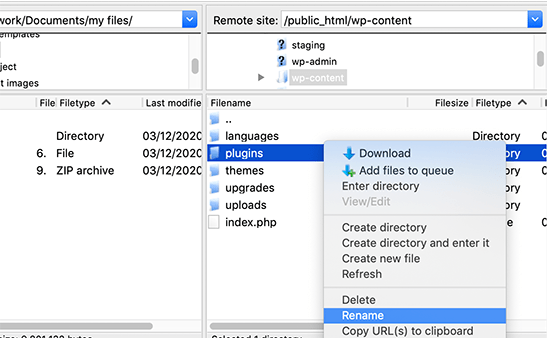

In our example, the name has been changed from plugins to plugins.deactivate. Such an action made it impossible for “WordPress” to find the directory containing the plugins and thus consider them inactive. You can now check if you will be able to log in to the backend of the website.

Remark! Remember to either revert to the original name or create an empty directory called plugins when you’re done, which will allow you to install the plugins again.
Method Two – Database – phpMyAdmin
1. Log in to the “phpMyAdmin” panel to the database associated with your website based on the “WordPress” CMS.If necessary, HERE you will find information on where to find this option in the mybox panel.

2. After logging in, find the ones called wp_options in the list of tables associated with your website and click on its name to open the table content view.

3. In the column specified as option_name, find the active_plugins item and click on the “Edit” link located on the left. By default, in the value column in the option_value section, you’ll see a list of currently active plugins. Select them, keep this value in Notepad if necessary, and then delete it.

4. Enter the value a:0:{} in the currently empty field and click the “Execute/Go” button located in the bottom right corner of the page.

The plugins have been disabled and if it was one of them that made it impossible to log in to the backend of the site, now this action should be possible.