


To change the API key in your Cloudflare account integration, you need to get a new API key from your account to get started. A description of obtaining an API key can be found HERE.
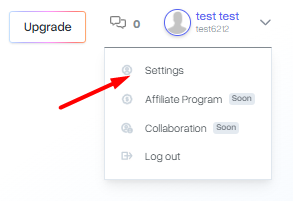
Then, with a new key already generated, log in to the mybox panel and click on your name in the upper right corner, select Settings from the menu.

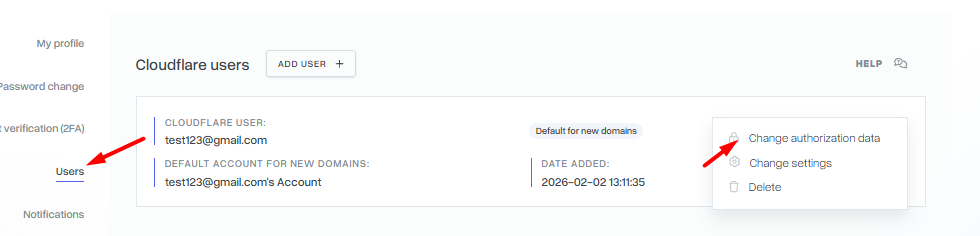
On the page, go to the Users section and next to the selected profile, click the Actions menu and select Change authorization data from the list.
Fill out the form with the email address associated with your Cloudflare account and the new API key and confirm the change by clicking the Add button.
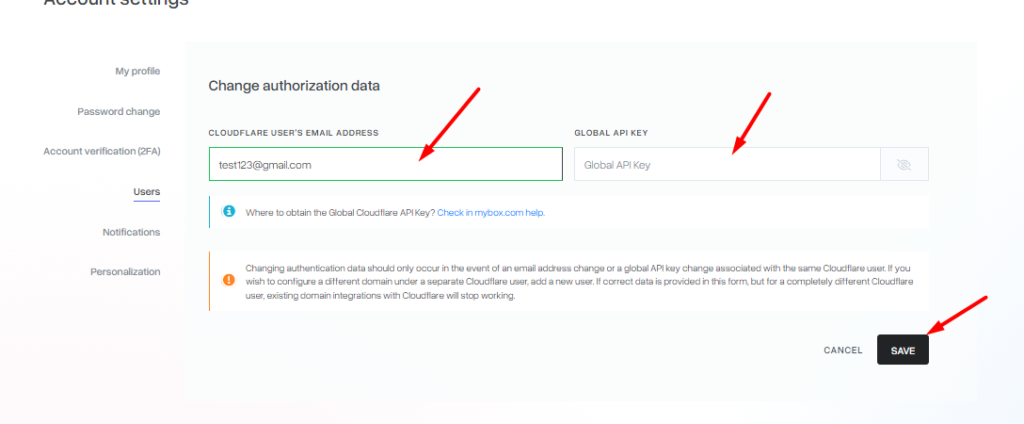
A change in authorization information should only occur if the email address or global API key assigned to the same Cloudflare user changes. If you want to use a separate Cloudflare user to set up a different domain, add a new user. If you provide the correct data in the form, but for a completely different Cloudflare user, the existing domain integrations with Cloudflare will stop working.