


A MySQL database is a secure environment used to store your website’s structured data, such as posts, user profiles, and settings. To function, a database requires a dedicated user with specific permissions to access and modify that data.
Table of Contents
Context
When setting up a new application or website, you typically need both a new database and a new user simultaneously. The mybox panel provides a streamlined process to create both in a single step, ensuring they are correctly linked from the start.
Step-by-Step Configuration

To create both components at once, follow these steps in your dashboard:
Access the Database Section: Log in to the mybox panel and navigate to the Databases or MySQL Users tab.
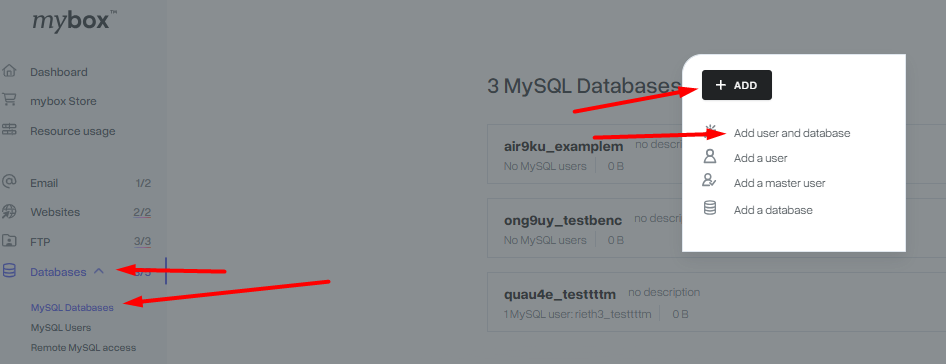
Open the Creation Form: Click the + Add button and select Add user and database from the dropdown list.
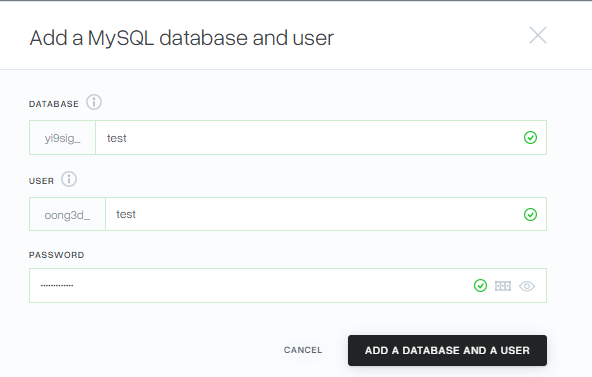
Complete the Form: * Database Name: Choose a unique name for your database.
- Username: Create a name for the user who will access this database.
- Password: Set a strong, unique password for the database user.
Confirm: Click Add a Database and User to finalize the process.
Distinction: Database vs. Database User
- Database: The “container” where your data is organized into tables.
- Database User: The “keyholder” or identity used by your website scripts (like WordPress) to connect to that container.
Practical Implications
- Default Permissions: When using the combined creation form, the system automatically links the user to the database. However, specific granular permissions (like “Read Only” or “Drop”) are set to a standard default.
- Adjusting Permissions: If your project requires custom access levels, you must manage these manually in the MySQL Users tab after the initial creation is complete.
- Connection Details: Once created, you will use these credentials (Database Name, Username, Password, and the Hostname found in your account details) to configure your website’s configuration files (e.g.,
wp-config.php).
Summary
Creating a database and user together is the most efficient way to prepare your environment for a new installation. By managing these through the mybox panel, you ensure that your website has a secure and correctly configured data layer from day one.