


Mailbox management in mybox is handled through the Actions menu available next to each email account in the mailboxes list. This menu contains all key operations for managing email accounts, including security, storage, and configuration settings.
Table of Contents
Available actions
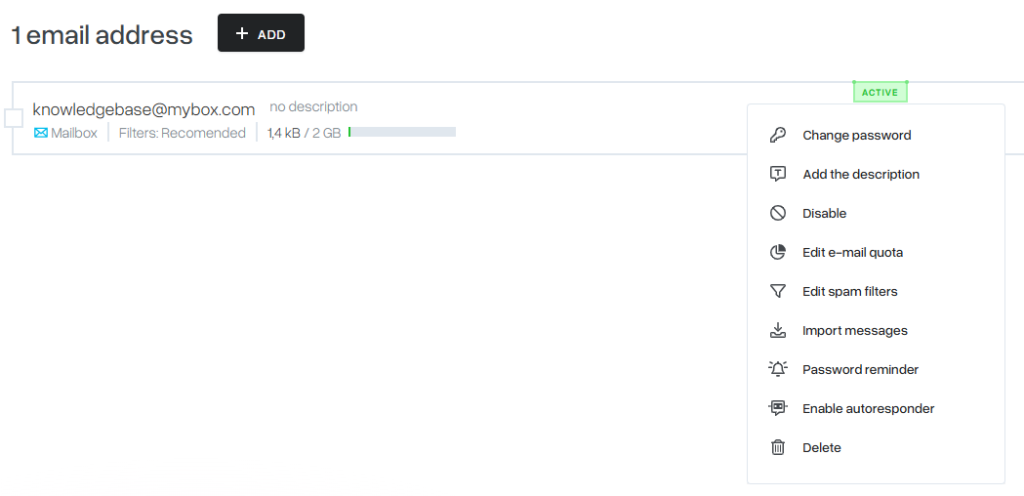
Change description

You can assign or update a description for the mailbox.

The description is displayed next to the mailbox name to help identify it more easily in the panel.
Change password

Allows you to change the password for the email account.
If a mobile phone number is linked to the account, the new password can be delivered via SMS.
Turn off

Disables the mailbox without deleting it.
A disabled mailbox remains visible in the list and can be reactivated later.
Edit quota

Defines the storage limit for the mailbox.
This controls how much data the mailbox can store before it becomes full.
Edit AntiSpam

Allows configuration of spam filtering settings for the mailbox.
You can adjust filter sensitivity and behavior based on your needs.
Import messages

Enables migration of emails from another provider or mailbox.
You need to provide:
- source mail server address
- mailbox name
- mailbox password
Once started, the system imports messages into the target mailbox and notifies you when the process is complete.
Change password reminder

Assigns or updates a phone number used for password recovery.
This allows password reset via SMS using a recovery form.
Delete

Permanently removes the mailbox and all associated data.
This action cannot be undone.
Collective actions
You can perform bulk operations on multiple mailboxes by selecting them using checkboxes and choosing an action from the batch menu.
Available collective actions include:
- Enable
- Disable
- Delete
- Change password
- Edit quota
- Archive
Summary
Mailbox actions in mybox provide full control over email account management, including security, storage limits, spam filtering, migration tools, and bulk operations.