


AI bot management in panel.mybox.com lets you control which AI crawlers can visit and index your website. This is useful when you want to limit unwanted crawl activity, reduce resource usage, or decide which AI services can access your content. The settings are managed per website from your mybox client panel.
Table of Contents
Check the current AI bot status
Sign in to panel.mybox.com and open Websites. For each website, you can see whether any AI bot blocks are currently active and how many AI bots are being blocked.a
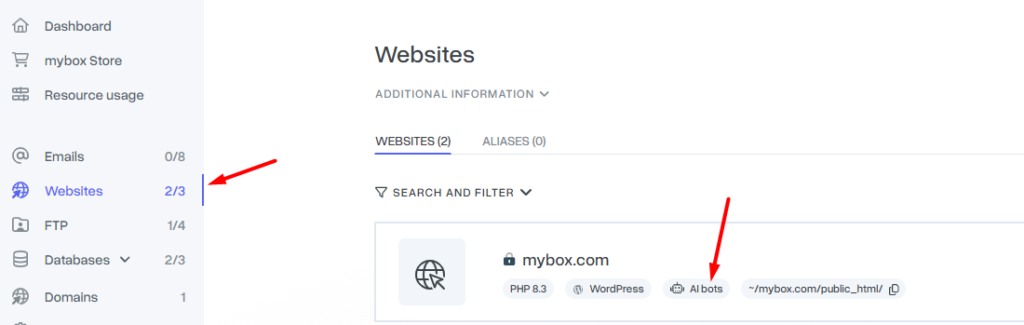
Open AI bot management

Find the website you want to manage, open the Actions menu, and select AI Bots. This opens the settings page for AI bot blocking for that website.

Choose which AI bots to block
The management view shows a list of AI bots that can be blocked. To enable a block for a specific bot, use the toggle next to it. You can turn blocks on or off individually, so the settings can match the needs of each website.

How the bot categories work
To make the list easier to use, the available AI bots are grouped into three categories. These categories help you decide which bots are usually worth blocking and which ones may still be useful, depending on how you want your site to appear in search tools or AI services.
- Recommended to block – These bots may increase CPU usage and, as a result, increase scaling costs, while often providing little or no valuable traffic or AI visibility for your website. Blocking them does not affect your position in Google.
- Your choice – These bots may be useful if you use a specific SEO tool or if you want your website to be present in AI search services such as ChatGPT Search or Perplexity.
- Neutral – These bots usually do not affect your website’s visibility in search engines or in widely used AI assistants. Some of them may indirectly contribute to your domain’s presence in AI models.
These settings apply to the selected website. If you manage more than one site, review the AI bot settings for each one separately. After changing a toggle, the new block status should be visible in the panel for that website.