


The mybox panel is your account’s control center. From the left-side menu you can manage all elements of your hosting service - websites, email, databases, resources, and support.
The panel is a proprietary mybox solution, developed in-house. This means it can be tailored to your needs without the constraints or costs of an external license.
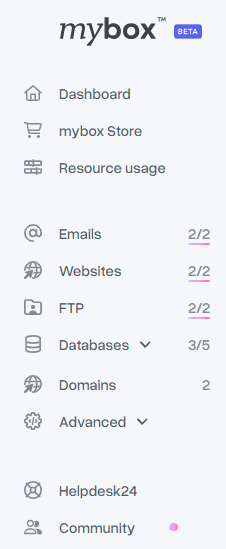
Available sections in mybox panel
| Section | What it does |
| Dashboard | The main view after logging in. Shows a summary of active services, recent activity, account status, and quick access to the most important actions. |
| mybox Store | Purchase add-ons when current limits no longer fit your needs - extra RAM, CPU, disk space, additional websites, and more. |
| Resource Usage | Detailed insights into how your hosting resources are being used, including disk space, CPU, and RAM. Useful for tracking performance and identifying limits before they affect your website. |
| Manage everything related to email - create mailboxes, check usage, change passwords, and configure spam filtering. | |
| Websites | Add and manage websites on your account. Choose between a blank setup or automatic CMS installation. SSL certificates are also managed here - free Let’s Encrypt or a commercial option. |
| FTP Accounts | Create, modify, and delete FTP accounts. Restrict access to a specific subdirectory - useful when giving limited access to a third party. |
| Databases | Databases are created automatically when you add a new website, but can also be created manually. Includes user management and external IP access control. |
| Advanced | Additional options including Redis object cache, SSH access, and CRON job configuration. |
| Helpdesk 24h | Open a support ticket and contact the mybox support team directly from the panel. |