


An email alias is a virtual address that forwards incoming messages to an existing mailbox. It allows you to receive mail sent to multiple addresses (e.g., [email protected] and [email protected]) within a single shared inbox.
Table of Contents
Context
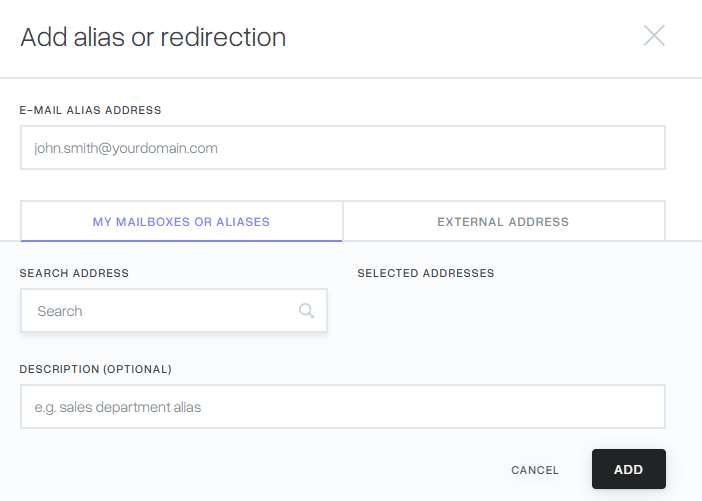
Aliases are ideal for managing different business functions without the need for multiple sets of login credentials. In the mybox panel, you can create an alias that points to one or more internal mailboxes, or even to external email addresses.
Method 1: Creating a standalone alias or redirect

This method is best when you want to create an address from scratch and decide where its mail should go.
- Access the Email Tab: Log in to the mybox panel and select Email from the side menu.
- Add Alias: Click the + Add button and select Alias or redirect.


Method 2: Adding an alias from an existing mailbox
This is the fastest way to add an extra address to a mailbox you are already managing.
- Open Mailbox Details: In the Email section, click on the specific mailbox you want to modify.
- Add Address: Select the Additional email addresses to your inbox tab and click the Add button.


Distinction: Alias vs. Mailbox
- Mailbox: A physical storage space with its own login and password. It holds emails on the server.
- Alias: A “pointer” only. It has no password or storage of its own; it simply redirects mail to a physical mailbox.
Practical Implications
- Identification: In your email list, aliases are clearly labeled with a “Description: Alias” tag under their name.
- Managing Recipients: You can view or change where an alias points at any time by clicking Details > Recipients. This will also show you the date each redirect was created.
- Outgoing Mail: When you create an alias, it is automatically added to mail.mybox.com. This allows you to select the alias in the “From” dropdown menu when composing new messages.
- Unlimited Forwarding: You can define multiple recipients for a single alias, effectively creating a small distribution list.
Summary
Email aliases are a flexible tool for organizing your communication infrastructure. Whether created as a standalone redirect or as an add-on to an existing inbox, aliases ensure that your mail always reaches the right person without the overhead of extra mailboxes.