


A MySQL archive backup is an additional, non-guaranteed copy of your database that is stored outside of your plan’s standard backup retention period. These backups serve as an extra layer of security, providing a historical snapshot of your data that would otherwise be unavailable.
Table of Contents
Context
Standard backups are generated automatically and kept for a set period (e.g., 7 or 30 days) depending on your plan. Archive backups are “excess” copies stored on a separate infrastructure. They are intended for emergency recovery situations, such as restoring a website after long-term malware corruption or recovering data lost due to historical development errors.
How Archive Backups Work

Unlike standard backups, which you can restore instantly from your dashboard, archive backups are managed as follows:
- Extended Retention: These copies are older than the standard backups included in your package.
- Infrastructure Isolation: They are stored on dedicated, separate infrastructure to ensure maximum data integrity and security.
- Availability: Up to two additional archival copies may be available for each database, though these are provided as a best-effort service and are not a guaranteed part of the hosting SLA.
Distinction: Standard Backup vs. Archive Backup
| Feature | Standard Backup | Archive Backup |
| Retention | Fixed (e.g., last 30 days) | Older, historical copies |
| Accessibility | Instant (via the mybox panel) | On-request (via Helpdesk) |
| Storage Cost | Included in plan allowance | Free (does not count toward limits) |
| Guarantee | Guaranteed by service terms | Non-guaranteed/Best-effort |
Practical Implications
Because archive backups are stored on separate infrastructure, they require manual intervention to retrieve.
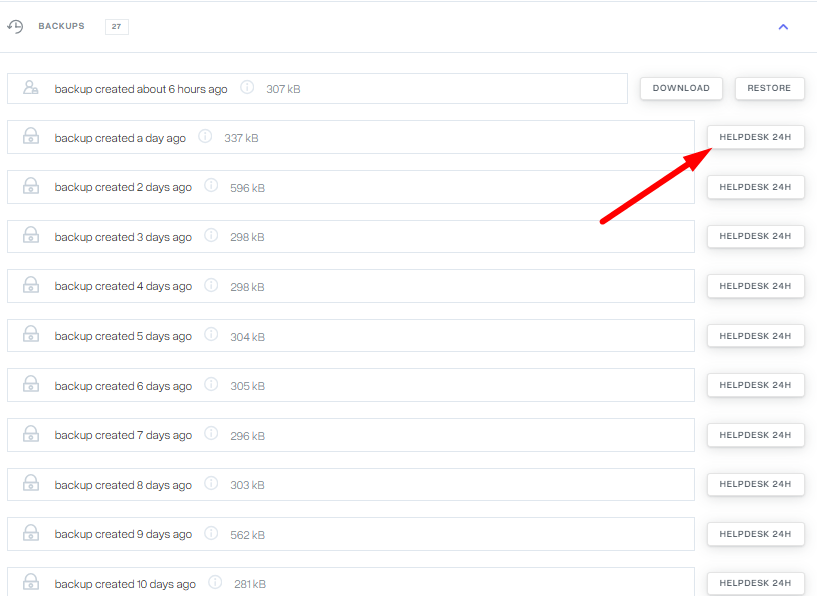
- Accessing the Data: To access an archive backup, you must submit a request through the 24h Helpdesk. You can do this by clicking the “Helpdesk 24h” button next to the specific archive entry in your backup list.
- Service Fees: While storing the archive is free, a service fee may apply for the manual restoration or provision of these historical files. A consultant will provide specific pricing details upon your request.
- Data Readiness: Once your request is processed, the database copy will be made available in your dashboard for administrative use.
Summary
MySQL archive backups act as a “safety net for the safety net.” They provide a way to recover data from the distant past, protecting your project from the long-term effects of technical errors or security breaches.