


CleanBox is mybox’s built-in anti-spam system. It filters incoming email automatically - no configuration required. The system uses a combination of traditional filtering rules, heuristic analysis, and machine learning to detect spam, phishing attempts, and malicious content before messages reach your inbox.
Table of Contents
How CleanBox Works
CleanBox analyses each incoming message on multiple levels. It evaluates not only the content of the message, but also the context - whether the sender is someone you’ve corresponded with before, whether the message is part of an ongoing thread, and whether the sender’s infrastructure (MX records, SPF, hostname) is correctly configured.

One key feature is the ability to block spam at the SMTP connection stage - before the message is accepted by the server. CleanBox also expands shortened URLs, checks redirects, and evaluates link destinations to detect phishing and spoofed domains.
Contacts with whom you actively correspond are automatically trusted, which reduces the risk of legitimate messages being incorrectly marked as spam.
Protection Levels
Instead of a manual scoring system, CleanBox offers three straightforward protection levels:
- Low - maximum openness, minimal filtering. Suitable if you want to receive all messages and manage filtering manually.
- Medium - balanced filtering. Recommended for most users.
- High - strict filtering. Suitable if you want to minimise spam at the cost of occasionally filtering edge cases.
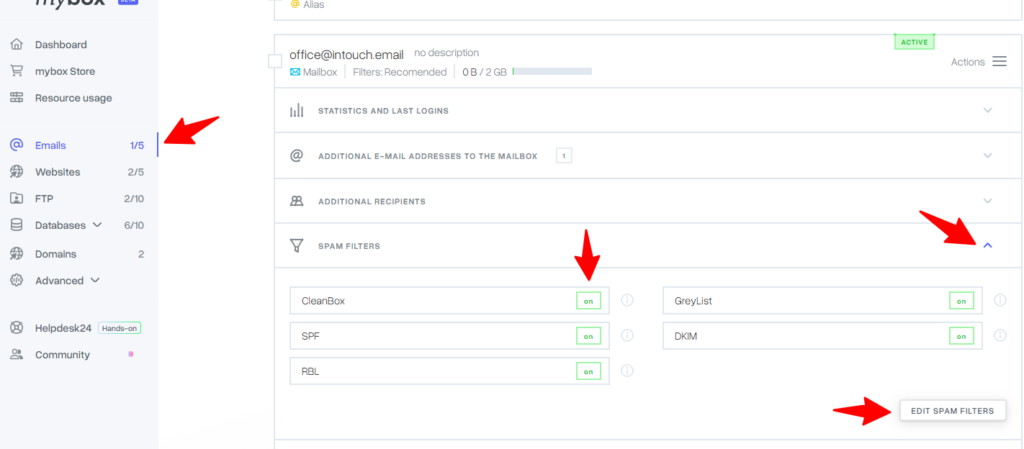
You can change the protection level in the Email section of your mybox panel.

What CleanBox covers
CleanBox operates automatically for all mybox accounts. It does not require activation or setup. The protection level can be adjusted at any time from your panel.