


Email accounts in mybox are tied to a domain in your account. You can create a mailbox on your own domain or use the free shared email domain intouch.email - available to all mybox users without any additional setup.
Table of Contents
Prerequisites
To use your own domain for email, it must be parked in the mybox panel first.

→ How to park a domain in mybox
To use intouch.email, no additional configuration is needed - the domain is available in the mailbox form by default.
Steps
1. Log in to the mybox panel and go to Emails.
2. Click + Add.
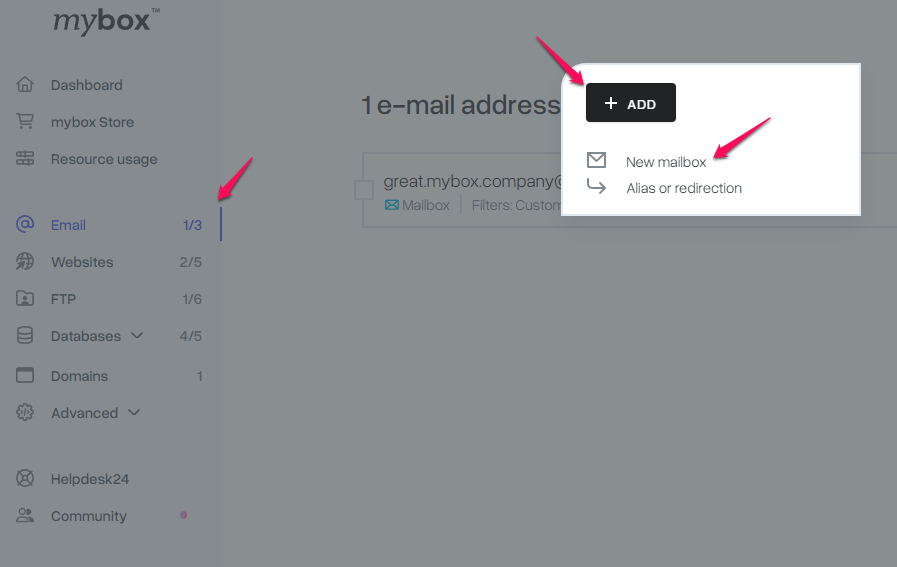
3. Fill in the mailbox form:
| Field | What to enter |
| Email address | The local part of the address (e.g. contact for [email protected] or [email protected]) |
| Domain | Select your own domain or choose intouch.email from the dropdown |
| Password | Set a strong password for the mailbox |
| Mailbox size | Set the storage quota for this mailbox |
4. Click New Mailbox to confirm. The mailbox is created immediately and ready to use.
What’s next
Once the mailbox is created, you can:
- Access email via WebMail at mail.mybox.com
- Configure an email client (Outlook, Thunderbird, Apple Mail) using IMAP or POP3
→ How to configure an email client
Mailbox limits per plan
| Plan | Included mailboxes | Additional mailboxes |
| One Box | 1 | Via add-on (5 RON per year, up to 9 additional) |
| Flex Box | 20 | - |
| Prime Box | Unlimited | - |
Early Access
Mailbox creation is available in early access. The intouch.email shared domain is available by default - no configuration required. Additional mailbox add-ons are free during Early Access.