


It may happen that having several or even a dozen websites on your account, a mistake will occur when deleting one of them and the wrong domain will be removed from the list.
Remember that removing a page from the list in the mybox panel does not automatically delete files and databases related to the page, so to fix the mistake, you just need to add the web page again.

1. In the mybox panel, go to the section: “Websites” and click the “+Add” button there
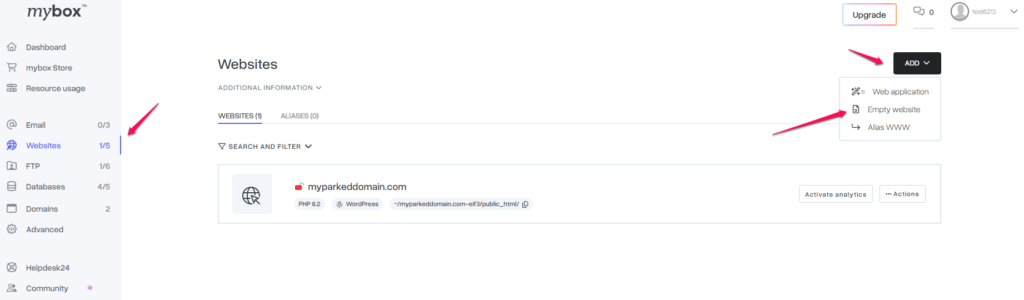
2. In the first field, enter the domain name of the website that has been deleted, and then in the field containing the path, make sure that it is the same as the one where the website has been running so far.

If you are not sure, you can check the directory structure and thus the paths by logging in to the FTP of your account. Instructions on how to log in using the “WinSCP” application can be found HERE.
3. After adding the page again, it may take from a few to several minutes before the website starts responding again. This is the time required for the server settings to reload and refresh.
If you have a problem with adding a website again, contact our support department from the the mybox panel level in the 24h Helpdesk.