


In a situation where you are to modify records in the DNS zone, you can do it from the the mybox panel level.
Once logged in, go to the “Domains” section
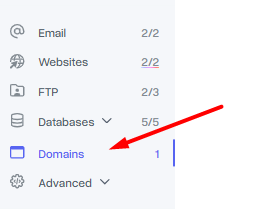
Next, make sure that your domain is currently pointing to DNS servers from mybox.com. You can proceed to editing by clicking on the “Manage DNS” tab.


On the page that appears, you’ll see a table that contains the DNS records for your domain. You can proceed to modify existing records by clicking on the “Edit” button on the right.

or if necessary, you can add a new record by clicking on the green “Add record” button located at the top left of the page, after you expand the file “Actions”.

Remark
Each change of this type after saving requires propagation , i.e. broadcasting the change or the appearance of a new record on the Internet, which can take up to 24 hours. This is a mybox.com-independent process, so we have no influence on the propagation time and we cannot speed it up.