


When you add or park a domain in the Mybox control panel, the email service is not activated automatically. This is because the domain must first be correctly configured to direct email traffic to Mybox mail servers.
Before activating the email service, make sure your domain’s DNS settings have been configured correctly.
Table of Contents
Which DNS servers should I delegate a parked domain to?

To make a full delegation, at the registrar where the domain was purchased and is maintained, change the records to:
ns1.mybox.com
ns2.mybox.com
How do I modify the records in the DNS zone with my current carrier so that the email service works properly under mybox.com?
Set MX records to:
mx-1.mybox.com
mx-2.mybox.com
Set your SPF record to:
v=spf1 include:_mail.mybox.com -allNote
Remember that changing both domain delegation and records is associated with propagation, i.e. announcing the change on the Internet. It is assumed that this process can take about 24 hours.
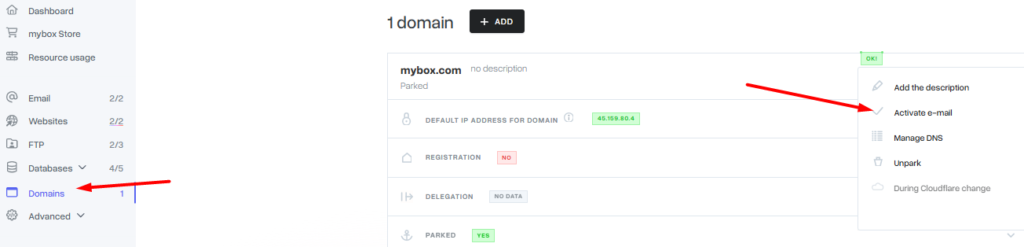
When you are sure that the domain is correctly directed, go to the “Domains” section in the mybox panel, click on the selected domain in the list, then expand the “Actions” item and click the “Activate e-mail” button.
Note
If, despite the delegation of the domain, the system communicates the inability to launch the mail service, please contact our support department.