


Keeping your account details up to date ensures that you receive critical service notifications, security alerts, and properly addressed billing documents. You can modify your profile information directly through the mybox panel.
Table of Contents
Context
Your contact information represents the administrative layer of your account. This includes your primary email address, phone number, and physical address. While you can update these details for communication purposes at any time, changes to the legal entity owning the account (such as moving from a private person to a company) require a different process called a “cession.”
How to update your profile

To modify your current contact details, follow these steps:
- Access Settings: Log in to the mybox panel. Click on your name in the top-right corner and select Settings from the dropdown menu.
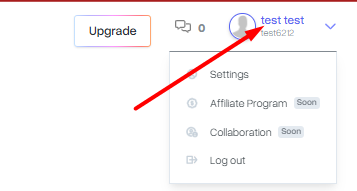
- Locate Profile Module: On the Account Settings page, find the My Profile section. this displays the contact information currently associated with your account.

- Enter Edit Mode: Click the Edit button at the bottom of the profile section.
- Save Changes: Update the necessary fields and click Change Contact Details to sync the new information with our system.

Distinction: Contact Updates vs. Legal Cession
It is important to distinguish between updating your mailing details and changing the account owner:
- Contact Update: Changing your phone number, secondary email, or moving to a new home address. This can be done instantly via the steps above.
- Account Cession: If you are selling your website or transferring the account from a person to a business entity, this is a legal transfer of ownership. This requires a formal cession process rather than a simple settings edit.
Practical Implications
- Billing & Invoices: Updating your profile settings will apply to future invoices. If you have an unpaid pro-forma invoice that requires a data change, do not pay it yet. Instead, contact our 24h Helpdesk to have the document re-issued with the correct details.
- Domain Verification: For global domains (.com, .net, etc.), changing your profile email may trigger a mandatory ICANN verification email to ensure your contact data remains valid.
- Security Alerts: Ensure your primary email is one you check frequently, as this is where password reset links and resource limit alerts are sent.
Summary
Maintaining accurate contact data is the best way to ensure uninterrupted service and clear communication. By using the Settings menu in the mybox panel, you can keep your administrative profile aligned with your current contact preferences.